

EMC Expert 2025 Release Highlights
Major Highlights
- Virtual EMC Laboratory (EMC Toolkit) – Advanced Simulation & Analysis for System-Level EMC
- Python-Based Scripting for EMC Toolkit Data Processing, Task Assembling and Post Processing
- Automated Simulation Workflow Management with Built-In EMC Toolkit Add-Ons
- New Features in Model Handling for EMC Analysis
- Support of Harness Data Import from VEC v1.1.3 (Vehicle Electric Container)
- New Features in Harness Data Import, Handling, Visualization and Navigation
- New Features in Model Handling Operations
- Improvements in Reporting Engine
- New Features and Expert System Engine
- New EMCoS CAD Simplifier Tool (Simplification of Complex Housings)
- ReMesh New Features and Improvements
- New EMCoS SRC3D (Source Reconstruction Tool)
- EMCoS SimDAT New Features and Improvements
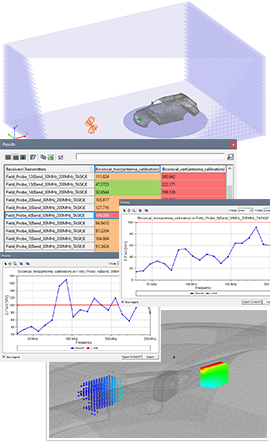
Virtual EMC Laboratory (EMC Toolkit)
New Simulation & Analysis for System-Level EMC
EMC Toolkit is a new-generation Virtual EMC Laboratory specifically developed for automotive EMC applications. It addresses the unique challenges of the automotive industry by integrating international and OEM-specific EMC standards, ensuring compliance throughout both design and testing phases.
Virtual Test Setups
- Vehicle Immunity Tests According to ISO 11451-2 Standard
- Vehicle Emission Tests According to ECE R10 Standard
- Vehicle Antenna Tests According to CISPR-25 Standard
- Human Exposure Tests According to ICNIRP 1998 & 2010 Guidelines
Automated Simulation Workflow Management
- Python-Based Scripting for EMC Toolkit Data Processing, Task Assembling and Post Processing
- Workflow Automatization with Built-In EMC Toolkit Add-Ons
- Automatic Report Generation in PowerPoint (PPT) Format
New Features in Model Handling for EMC Analysis
- Modeling of Observation Quantities (Near Field Areas and Field Probes) for EMC Analysis
- Definition of Immunity Parameters for Near Field Areas and Field Probes
- Built-In Python Classes and Functions for Near Field Area and Field Probe Operations from Scripts
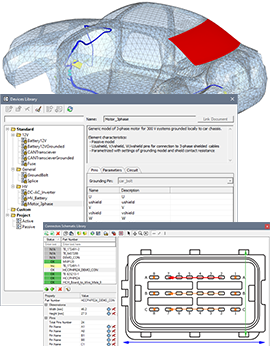
- Modeling of Electrical Components for EMC Analysis
- EMC Components Linked to Connectors, 3D Housings and Circuit Models
- Definition of Emission and Immunity Parameters for EMC Components
- New Devices Library with Standard Built-In and Custom Models for Circuit Netlists of Terminating Devices
- Built-In Python Classes and Functions for EMC Component Operations from Scripts
- New Connectors Schematic Library
New Features in Harness Data Import & Handling
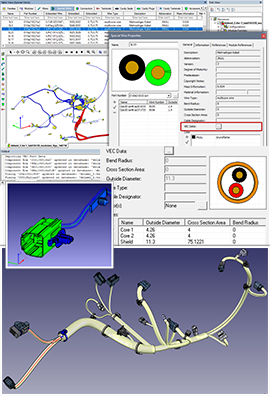
- Support of Harness Data Import from VEC v1.1.3 (Vehicle Electric Container)
- Update Existing KBL Harness Database with Part Master Data from VEC
- Import Part Master Data to Parts Library
- Parts Library and VEC Data Viewer
- Import Harness Configurations from KBL
- Support of KBL v2.5
- Import Harness from CATIA V5, Wire Table, CATIA V5 + Wire Table
New Features in KBL Configurator
- Simultaneous Configuration and Modules Extraction for Multiple Databases
- Export/Import/Save Operations for Multiple Datasets
- Modules Extraction Based on Configuration File
New Engine for Harness Data 3D Visualization
- Advanced Rendering Techniques
- Realistic Lighting and Customizable Color Schemes
- New ‘Treat B-spline Curves as Clamped Uniform B-splines’ Option for Better Handling of Segments Visualization
- Possibility to Visualize Segments with Real Diameter or Fixed Size
- Improved Visualization of Auto and User-Defined Labels
- Improved Ruler to Measure Distance between Model Objects
New Features in Harness Data Navigation
- Improved Navigation in Table and Tree Views
- Extended Search Engine
- Extended Segments Cross Section Viewers for Data Groups
- Topology View for Data Groups
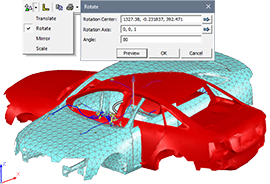
New Features in Model Handling Operations
- Support of Transformation Operations for Meshes, Antennas & Field Probes (Translate, Rotate, Mirror and Scale)
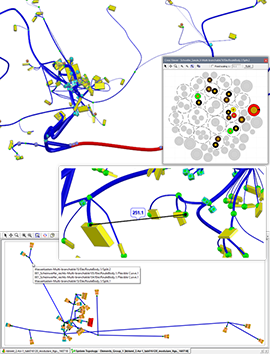
- Advanced Distance Measurement Tool for Wires (Route Length, Common Length, Length of Parallel or Common Segments, Total Length)
- Distance Measurement between Harness Objects (Segment – Segment, Connector – Connector, Fixing – Terminal, etc.)
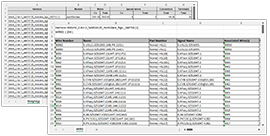
Improvements in Reporting Engine
Report generation has been significantly improved with enhanced speed and efficiency, and can now be performed independently of whether MS Excel is installed on the user’s machine.
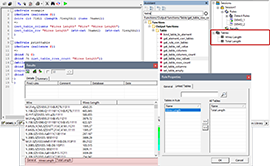
New Features in Expert System Engine
- Improved Rule Editor and CLIPS Functions Assistant
- Extended List of Built-In CLIPS Functions
- Encryption/Decryption of Sensitive CLIPS Rules
- Support of Output > Table Functions
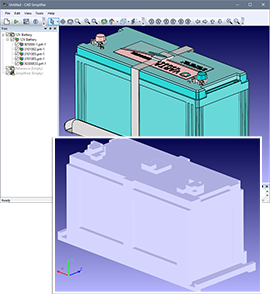
New EMCoS CAD Simplifier Tool
(Simplification of Complex Housings)
- Integrated 3D Viewer and CAD Parts Tree with Intuitive Show/Hide and Invert Selection Options for Efficient Geometry Navigation
- Import Geometry from ACIS SAT/SAB, IGES, STEP, CATIA V4&V5, JT, NX, NASTRAN, PLMXML File Formats
- Automatic Skipping of Hidden and Minor Parts to Accelerate and Optimize the Simplification Process
- Copy/Paste of Visualization Meshes for Seamless Transfer to other EMCoS Tools
- Parallel Threading to Speed-up Geometry Simplification
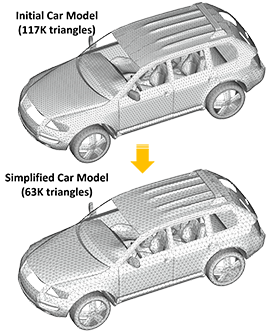
New ReMesh3D Library in ReMesh Environment
This new release introduces the ReMesh3D library with completely redesigned meshing algorithms to simplify remeshing routine process. No manual work is now required to heal and fix intersections even in huge vehicle models.
- New Algorithms and Techniques for Remeshing Maintain the Original Geometry while Reducing the Number of Triangles
- Iterative Technique for Automated Simplification of Computational Meshes with User-defined Mesh Size
- Processing Time from Several Seconds up to Several Minutes
- Discrete Geometry Import from *.STL File Format
- Extended Rod-to-Weld Conversion to Multi-Layered Surfaces
- Faster Separate Properties Operation Optimized for Large Mesh Models
- Materials Data Reading and Editing from NASTRAN Files
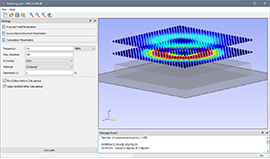
New Features in EMCoS SRC3D (Source Reconstruction Tool)
- Support of Planar and Arbitrary Surface Scans
- Support of Multi-Frequency Scanned Data
- Automatic Generation of Near Field Source (NFS) around Reconstructed Dipoles Cloud for Integration into Simulation Workflows
- Flexible GUI for Input Parameters and SRC3D Solver Settings Definition
EMCoS SimDAT New Features and Improvements
- New Merge Curves Operation to Fill Gaps between Curves Regions
- Copy 2D Plots to SVG File
- Minor Improvements and User-Requests